Effects · Act I
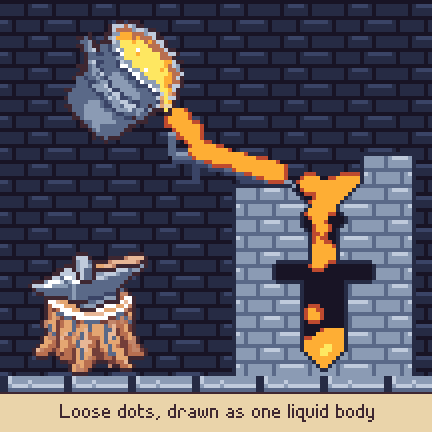
Particles that simulate liquids are often used, but you can make them more interesting with a simple trick: Give each dot a soft glow, add the glows up, keep what is over one level. Dots that are close become one smooth body. Two more levels give it an outline and a hot core.
Draw my particles as metaballs: sum a soft glow per particle and threshold it into one liquid body.
Read the whole briefFold the brief
Draw [my lava particles] as one body of liquid, with metaballs.

- Keep my particle simulation as it is: discs that fall and bump.
- For each pixel, add up a soft bump from every particle within [4] px.
- Cut the sum at three levels: a rim, the body, and a core where the liquid is deep.
- Each level is one flat color of my palette: [rust, amber, yellow]. No gradient or blur is left on screen.
- Do it [in a shader, on an off-screen buffer at my art's resolution].
- Two drops join into one body when they are about [5] px apart.
- Cooling, poison or mud is the same three levels in other colors.
Change what stands in [brackets] to fit your game.
- You already have particles and want them to read as one liquid: lava, slime, water, blood.
Not forIf you wanna build Subnautica 3 in pixel art… this technique is good for liquid animations, but for a large-scale water sim, you wanna build a specific system for that.
Jim Blinn summed soft blobs to draw atoms in the early 1980s.[1] Games draw each particle of a liquid as a blurred dot and cut the sum at a threshold.[2][3] Cutting it at several palette levels is this atlas's own reading.
- Metaballs, Wikipedia
- Ricardo Quesada, Integrating LiquidFun with Cocos2d-x, part II, 2014
- John Wigg, A simple method for creating 2D metaballs