Effects · Act I
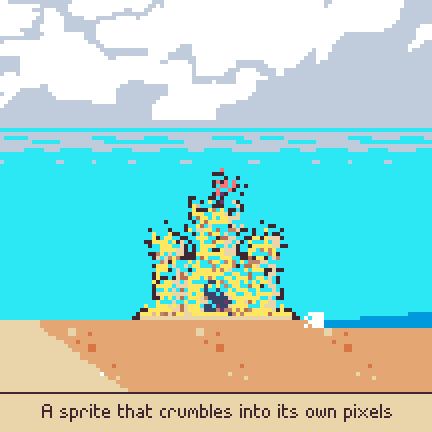
Always aim for adding interesting surprises in your game. Why does your monster die with a simple blink rather than dissolving like sand? Here's a trick on how to do it in pixel art: Each pixel becomes a grain in its own color: it falls if the cell below is free, slides to a lower corner if not, then rests. A random drop of one to three cells makes every fall different.
When a sprite dies, crumble it: each pixel becomes a grain of falling sand that piles up.
Read the whole briefFold the brief
When [an enemy] dies, make its sprite crumble into a pile. No animation is drawn.

- Every opaque pixel of the sprite becomes a grain and keeps its color.
- Use a grid [3] layers deep. The sprite starts in the middle layer.
- Each step, from the bottom row up, each grain picks a drop of 1 to [3] cells.
- If the cell under it is free, it falls. If not, it tries left, right and the two other layers, in random order.
- If nothing is free it tries a shorter drop, then stays.
- Draw, for each pixel, the first grain met through the layers. Stop when a step moves nothing.
- Play it at [11] steps a second, with [a new seed each time].
- Then [fade the pile after 2 seconds].
Change what stands in [brackets] to fit your game.
- To add some randomness and an organic look to enemy deaths.
- Can also be used in reverse as a spawn effect.
Not forMany large sprites at once: every pixel is a grain. Bake the fall to a few frames instead.
Pierre Vigier described the method in 2020 for his game Vagabond, three layers deep,[1] and published a script that bakes any sprite's fall into frames.[2] The tide that takes the pile away is this atlas's addition.
- Pierre Vigier, Procedural death animation with falling sand automata, 2020
- Pierre Vigier, death_animation.py, GitHub