Environment · Act I
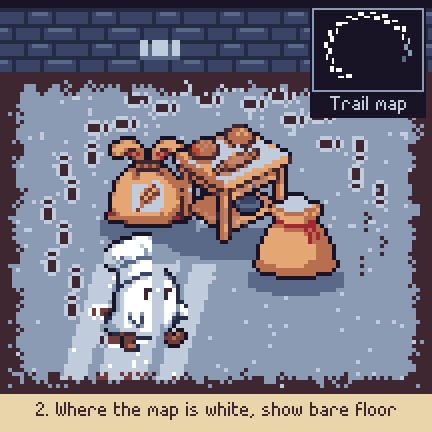
Another details tip for a surface with something on it: Give the ground a hidden second picture, the trail map. Whatever touches the ground stamps the map, and the ground reads it as it is drawn. Each frame the map fades a little: the snow settling back.
Add a trail map to my ground: everything that walks on it stamps the map, and the ground reads it.
Read the whole briefFold the brief
Make my [snow] remember what crossed it, with a trail map.

- Keep an off-screen picture the size of [the play area], one value per ground pixel. That is the trail map.
- Stamp: whatever touches the ground draws its shape into the map. [A boot print per step, a line behind a sled.]
- Read: the ground looks the map up as it is drawn. Marked is bare, a pixel beside a mark is a ridge of pushed [snow], the rest is cover.
- Settle: every frame the whole map loses a little, so marks fill in again after [6] s.
- Stamp deeper than the ground reads. A mark then stays whole and fades only at its end: one number sets how long marks last.
- Fade through an ordered dither, in quarters. No opacity.
- The map covers a set area: [scroll it with the camera].
Change what stands in [brackets] to fit your game.
- Soft ground: snow, sand, mud, tall grass, dust.
- Tracks that are gameplay information: following a monster, or hiding from one.
Not forA world larger than the map, unless the map scrolls with the camera: what leaves it is forgotten.
Unity's manual builds a self-healing trail map for snow and sand.[1] A tutorial for Unreal Engine keeps a gray mask where white is a trail.[2] In 2D, jess::codes draws a boat's wake from one.[3] The ridge and the figure are this atlas's own.
- Custom Render Texture example, Unity manual
- Tommy Tran, Creating snow trails in Unreal Engine 4, Kodeco, 2018
- jess::codes, 2D pixel water shader for Godot, GitHub