Sprites · Act I
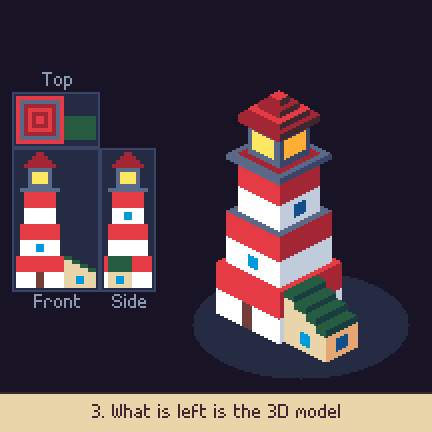
A cheap way of turning a 3-view projection into a 3D model with colors baked in and a pixel-art look.
Carve a voxel model from my three pixel drawings: front, side and top.
Read the whole briefFold the brief
Build a tool that turns three pixel drawings into a 3D pixel model.
Input: three images of [a lighthouse]: front (W x H), side (D x H) and top (W x D). Transparent means empty.

- Start from a full block of W x D x H cubes.
- Keep a cube only if all three drawings have a pixel in front of it.
- Color each outer face from the drawing that faces it.
- Show the model turning, flat shaded, on my pixel grid.
- Export it as [a sprite sheet of 8 headings].

Tell me its limits: hollows stay full, and round shapes come out square.
Change what stands in [brackets] to fit your game.
- Boxy props you can draw but not model: houses, crates, carts, furniture.
- A block-out. Three drawings in, a model out, to refine in a voxel editor or to render from eight sides.
Not forRound or hollow things. A cone comes out a pyramid, a cup a solid block.
The largest shape that fits a set of silhouettes is called the visual hull.[1] In 2025 elunvar showed a prototype that turns three projections into a 3D pixel model, its method unpublished.[2] The method and the figure here are this atlas's own.
- Visual hull, Wikipedia
- Instantly Convert Image Projections Into 3D Pixel Art, 80 Level, 2025