Making a Game Boy Advance game with GPT-6 Astra
Hugo -
It's my first blog post out there, so excuse my typos, I'm writing all of this by hand.
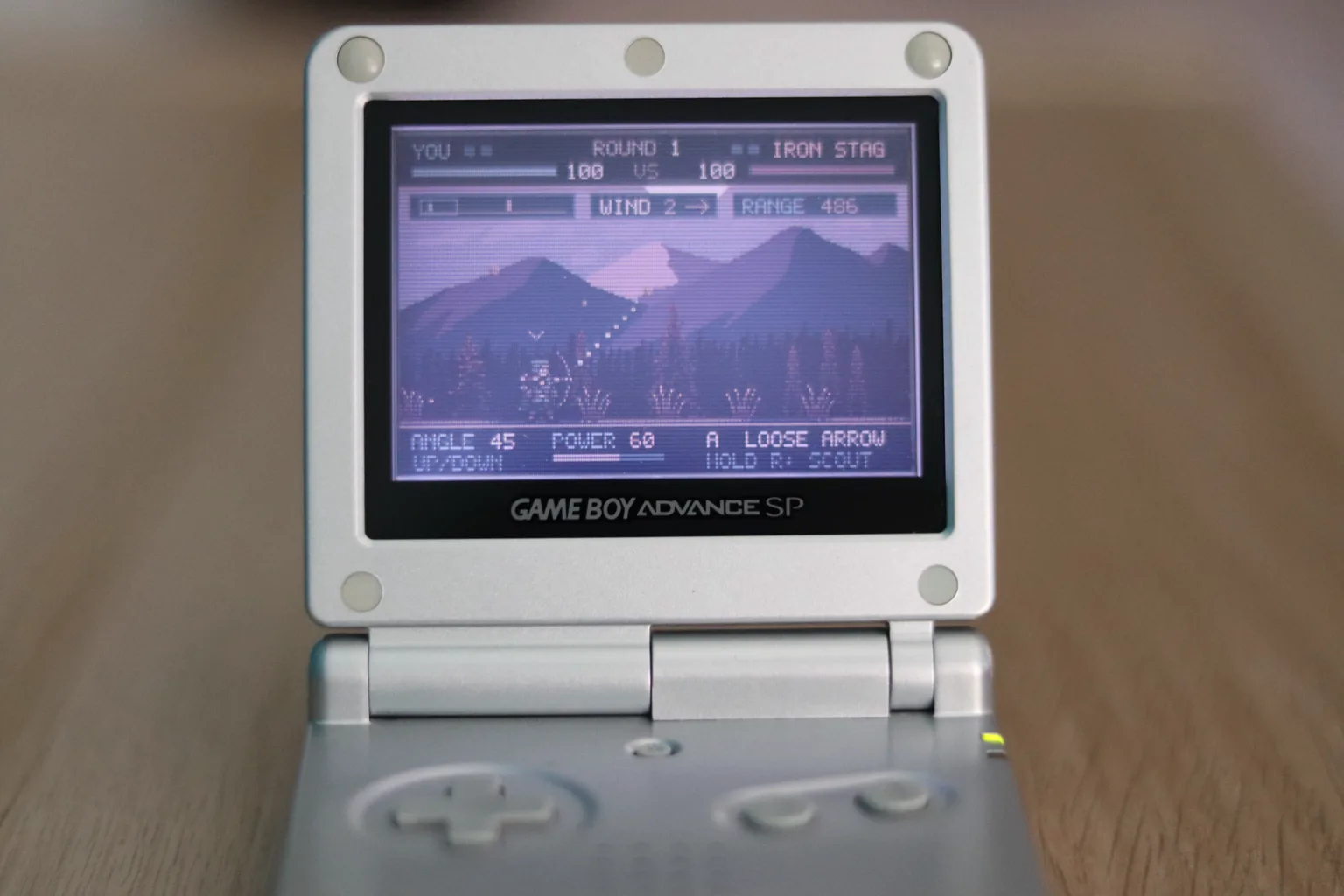
Do you remember that "Bowman" flash game? It's a simple archery game where the goal is just to hit your opponent. I played it a lot when I was a kid. Now that GPT-6 Astra is out, can it build a polished remake while following my guidance on art direction, game loop, and game feel.
Why on Game Boy Advance ?
The GBA is a handheld game console that was released in 2001. I remember how badly I wanted one when I was a kid. I played on a Game Boy Micro for quite some time before getting a GBA. Playing gen 3 Pokémon on the GBA is still one of my favorite childhood gaming memories.
So, can an LLM in 2026 make a game for the GBA ? Let's find out.
The initial prompt.
My initial prompt set the core game loop, the overall art direction, and some gameplay details.
Here it is:
 View prompt: Build the initial game
Let's make a Game Boy Advance ROM game.

It should be a single-player, turn-based bow duel against the computer, in medieval pixel art style.

The player adjusts the angle and power of a shot, releases an arrow, and the camera should watch where it lands. Then the enemy takes its turn. Arrows should follow an arc, with gravity and wind affecting their flight.

Give both archers health, make headshots stronger than body hits, and use short best-of-three matches. The enemy should make believable aiming mistakes, with a few difficulty settings.

Use the D-pad to adjust angle and power, A to shoot, and Start to pause. Show the controls, health, current angle, power, and wind clearly.

Use Sprite Fusion’s API for the artwork, including the characters, scenery, arrow, and splash screen logo. Keep the assets consistent with each other and create the poses and animations the game needs.

API documentation:
https://www.spritefusion.com/docs/pixel-art-generator/api

Use my API key in the .env file.

Make the full game, including a title screen, instructions, match results, and a way to play again. Use the GBA’s native 240×160 resolution and include artwork and sound inside the ROM.

I’ll test the .gba file in an emulator.
It was playable, but it lacked of FX and juice I expect from a polished game.
Assets generation
I used my own AI pixel art generator to generate the assets. I just gave the API docs to OpenAI Codex, and it figured out everything: Generating the assets in a consistent style, editing them when needed, animations etc.
There is also an MCP that connects directly with Sprite Fusion for ChatGPT/Codex and Claude.


Some leaves variations


View prompt: Generate leaf variations
One small dry golden ochre oak leaf drifting sideways in autumn wind. Simple asymmetrical pointed silhouette with a short thin stem and two darker ochre vein accents. Muted amber and warm brown palette, compact shape.
The LLM figured out amazing variations for the leaves. The player and enemy characters were cool too. The grass animation needed a few retries, though.
Game feel and juice
View prompt: Improve distance and art direction
The game works, but the duel needs more distance and a stronger visual identity.

Place the enemy far enough away that they are outside the starting view. I want to judge the distance, try a shot, watch its arc, and adjust my next attempt.

Add a way to scout the enemy by holding R, then return to the player when I release it. Follow the arrow with the camera, including high shots that travel above the initial screen. Briefly show the opponent and range at the start of each round.

Keep wind consistent during a round so I can learn from previous shots. Change the wind and distance between rounds.

For the scenery, use a better CC0 pixel-art background with a dusk sky, mountains, and distant trees. Add parallax while keeping the firing ground flat.

The enemy should look genuinely different from the player. Use Sprite Fusion to explore several designs in the same art style, including an armored archer with a stag helmet. Show me the alternatives before animating the selected design.
I once again tweaked my prompt to add more juice to the game: smooth camera movements, a blood effect when hitting the opponent, bow recoil, arrow trails, hit feedback, and aded the animated grass and leaves.
View prompt: Improve game feel and juice
The duel is playable now. Make shooting, impacts, and the battlefield feel more alive while keeping the action readable on the GBA screen.

Keep the existing game rules and aiming physics.

## Shooting and arrow flight

Give the archer a small backward recoil when releasing the bow, with a few particles near the string and a puff of dust at their feet.

Rotate the arrow along its flight direction. Give it a short, tapered trail that follows its actual curved path, fading from a pale highlight through gold into darker warm colors.

Let a few small streaks and particles peel away from the trail, slow down, and disappear. Existing particles should continue moving briefly after the arrow hits.

Keep the aiming guide short and readable: small warm dots with a dark shadow near the bow. It should indicate the launch direction without revealing the entire future trajectory.

Keep the previous shot’s trace sparse and subdued, with a button to toggle it.

## Hits

Make a hit immediately readable through a brief sprite flash, an outline, and a small burst at the contact point.

Push the struck character in the arrow’s direction and let them settle back. Add short, decaying camera shake, stronger for headshots and finishing blows. Keep the interface stationary.

Float the damage number upward and let the health bar drain with a delayed damage trail. On defeat, make the character fall backward around their feet.

Give shooting, body hits, headshots, and ground impacts distinct sounds. Misses should throw up dirt, leave an arrow in the ground, and indicate whether the shot fell short or went long.

## Blood

Add exaggerated pixel blood with simple physics. It should make hits satisfying without hiding the characters or turning into dismemberment.

Emit most of the blood in the incoming arrow’s direction, with a little backward spray. Body hits should produce less than headshots, and finishing blows should produce the strongest effect.

Start with short streams that break into droplets. Continue a brief, tapering emission after impact, following the character as they recoil or fall.

Mix tiny droplets with a few larger drops. Give them gravity, horizontal drag, and short tails aligned with their movement. Use brighter leading pixels and darker bodies and tails.

Larger drops can create one small secondary splash when they hit the ground. Prevent endless chains of splashes. Leave shallow stains that darken as they dry and remain until the next round.

Keep other impact particles restrained enough that the blood remains clear.

## Wind and nature

Make the wind visible in the world, using Sprite Fusion to create and animate matching grass and leaves.

Place grass clumps along the ground, leaving clear space around the archers. Keep their roots anchored and offset their animation phases so they do not sway together.

Mirror the grass for the opposite wind direction and hold a still frame in calm weather.

Carry small tumbling leaves across the battlefield with gentle vertical bobbing. Use small nearby leaves and even smaller, slower distant copies. They should remain background atmosphere around the duel.

Stronger wind should carry more leaves and move them faster. Reverse their movement with the wind direction. Calm weather should have no airborne leaves.

Keep world effects out of the interface.

## Animation and final presentation

Call the finished game Bowch! Center the visible title lettering, including its exclamation mark, and give the native-size shield enough room above it.
Final prompt & demo!
View prompt: Build Bowch!
# Build Bowch! for the Game Boy Advance

Make a complete, playable Game Boy Advance ROM called **Bowch!**: a single-player, turn-based archery duel against the computer, in medieval pixel art.

The game should be simple, readable, and satisfying to play, with exaggerated hit effects and a battlefield brought to life by wind.

Use the GBA’s native 240×160 resolution. Deliver a standalone `.gba` with its artwork and sound embedded.

## Game loop

Two stationary archers face each other across a long battlefield. The player adjusts the angle and power of a shot, releases an arrow, and watches it land. The enemy then takes its turn.

Both archers start with 100 health. Body hits deal 30 damage and headshots deal 45. Win two rounds to win the match.

Place the archers roughly 400–560 world pixels apart, leaving the enemy outside the starting view. Briefly show the opponent and range at the beginning of each round.

Use consistent projectile physics with gravity and horizontal wind acceleration. Keep wind constant throughout a round so previous shots provide useful information. Reroll distance and wind between rounds, supporting calm weather and wind in either direction.

The enemy uses the same projectile physics. Include three difficulty settings, with larger aiming errors on easier settings and correction after misses.

Include a title screen, controls screen, pause menu, round results, and rematches.

## Controls and camera

- Up/Down: adjust firing angle.
- Left/Right: adjust power.
- Hold B with a direction: make larger adjustments.
- A: shoot.
- Hold R: scout the enemy; release to return.
- Select: toggle the previous shot’s reference trace.
- Start: pause.

Disable shooting while scouting.

Keep the camera near the player while aiming, ease toward the opponent while scouting and during enemy turns, and follow arrows horizontally and vertically. High arcs must remain valid above the initial screen.

Keep health, round score, wind, and distance at the top. Put aiming values and contextual controls at the bottom. The interface stays stationary during camera movement and shake.

## Artwork through Sprite Fusion

Use **Sprite Fusion’s API** to generate the characters, poses, animations, arrow, shield crest, grass, and leaves.

API documentation:
https://www.spritefusion.com/docs/pixel-art-generator/api

Use my API key in the .env file.

Create a green-hooded player archer with brown leather equipment and a wooden bow.

For the opponent, create the **Iron Stag**: a compact armored archer with a closed steel helmet, short forked antlers, ochre tunic, dark sleeves, small purple mantle, and pale recurve bow.

Explore several enemy variants using the player as a style reference. Select a design with a distinct silhouette and proportions close to the player. Keep outlines, pixel density, and colors consistent across the artwork.

Use the animation operation for breathing idles and the edit operation for matching release poses. Preserve the selected character’s appearance across every pose.

Align head and body hitboxes with the finished sprites and launch arrows from their bows. Antlers and bows should not count as vulnerable body parts.

Generate an arrow and a crowned shield with crossed arrows for the title crest. Give the native-size shield enough room above the title. Center the visible “Bowch!” lettering, accounting for the narrow exclamation mark.

For scenery, use cohesive CC0 pixel-art layers with a dusk sky, pale sun, purple mountains, distant trees, and a forest edge. Keep the firing ground flat and scroll distant layers more slowly.

Use dark teal interface panels, bronze borders, cream text, gold highlights, and distinct player/enemy health bars.

## Aiming and arrow flight

Show a short dotted direction guide near the bow. Use small warm dots with dark shadows, indicating the launch direction without revealing the complete future trajectory.

Retain a sparse, subdued teal trace of the previous shot that the player can toggle.

On release, give the archer a small backward recoil, a few particles near the bowstring, and a puff of dust at their feet.

Rotate the arrow along its flight direction. Draw a short, narrow wake following its recent curved path, fading from cream through gold to bronze.

Add small streaks and motes that inherit some arrow velocity, drift apart, decelerate, and disappear. Existing particles should continue moving briefly after the arrow lands.

## Hits and misses

On a character hit:

- Briefly flash and outline the struck sprite.
- Add a small expanding burst at the contact point.
- Push the character in the incoming arrow’s direction, then let them settle.
- Apply short, decaying camera shake, stronger for headshots and finishing blows.
- Float the damage number upward, with a brief size emphasis for headshots.
- Animate the health bar toward its new value, leaving a delayed damage trail.
- On defeat, rotate the character backward around their feet.

Misses should kick up dirt, leave an arrow in the ground, and indicate whether the shot fell short or went long.

## Exaggerated blood with simple physics

Emit a directional blood burst from the contact point. Body hits produce a smaller spray, headshots a larger one, and finishing blows the strongest. Keep the struck character readable.

Most droplets travel in the incoming arrow’s direction, with a little backward spray. Begin with short streams that separate into drops.

Continue a brief, tapering emission after contact. Keep its origin attached to the character as they recoil or fall.

Mix single-pixel droplets with a few larger drops. Give them gravity, horizontal drag, and short velocity-aligned tails. Use brighter leading pixels with darker bodies and tails.

Larger drops can produce one small secondary splash when they land. Secondary droplets must not create further splashes.

Merge deposits into shallow ground stains. Fresh blood briefly appears brighter before darkening, and stains remain until the next round.

Keep competing impact sparks restrained so the blood stays clear. Make the effect stylized and exaggerated, without dismemberment or anatomical detail.

## Wind and nature

Use Sprite Fusion to create grass tufts with a sway animation.

Distribute grass clumps along the ground, leaving clear space around the archers. Keep roots anchored and offset animation phases so the tufts do not sway together.

Mirror the grass for leftward wind and hold a still frame in calm weather. Play the artwork directly without procedurally stretching the blades.

Generate the leaf using this prompt:

One small dry golden ochre oak leaf drifting sideways in autumn wind. Simple asymmetrical pointed silhouette with a short thin stem and two darker ochre vein accents. Muted amber and warm brown palette, compact shape.

Animate it tumbling. Keep leaves small enough to remain atmosphere around the duel: roughly 6×5 pixels nearby and 3×3 in the distance.

Use a shared crop across the leaf animation and crisp nearest-neighbor sampling. Distant copies can sample every other row and column of the larger frames.

Carry leaves across the battlefield with gentle vertical bobbing. Smaller distant leaves drift more slowly. Stronger wind carries more leaves, moves them faster, and increases their tumble speed. Reverse their travel with wind direction. Calm weather has no airborne leaves.

Keep grass, leaves, and other world effects out of the interface.

## Animation, runtime, and sound

Give both characters idle animations and matching release poses.

Use freestanding C and ARM assembly suitable for the GBA, fixed-point physics, and bounded particle storage. Target approximately 60 game updates per second.

Keep cosmetic randomness separate from gameplay randomness so visual effects cannot change wind, enemy decisions, or shot outcomes.

Use GBA sound hardware for a bow twang, distinct body and head impacts, dirt hits, menu feedback, and short victory and defeat phrases.

Build the finished Bowch! ROM. I’ll test it in an emulator.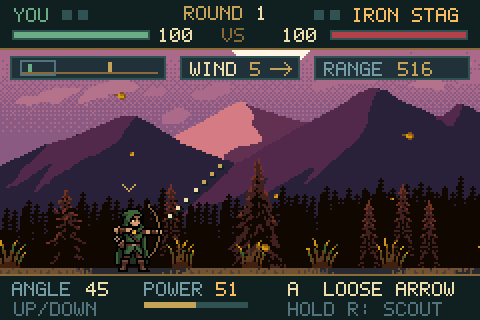
- ↑ ↓
- Aim angle
- ← →
- Shot power
- Z
- Shoot
- X + Arrows
- Larger adjustments
- E
- Scout the enemy
- V
- Toggle shot trace
- Enter
- Start / pause
Click inside the game to use the keyboard.
Conclusion and thoughts
Honestly ? We live in crazy, crazy times. It is just mind-boggling that a machine was able to code the whole game in plain C, compile it for the Game Boy Advance without any errors, and use all the tools (assets API, emulator tests, etc.) on its own to follow my art direction instructions.
It's easy to get a sloppy prototype from an LLM, but also surprisingly easy to make it great. The only difference is: Do you know how it should look and feel ? If you have no idea, prompting the LLM to "make it pop" wont save you.
Steering the LLM takes a good intuition for how the game should feel. How might we build such intuition ? I think it's by exposing ourselves much more to art and creativity (not only game-related art), which strengthens our ability to recognize why we like something.
Hugo
Aknowledgments and tools used
- EmulatorJS and mGBA for the browser emulator
- Sprite Fusion for the pixel art generator
- OpenAI GPT-6 Astra for the game development
- Scenery by Ansimuz: Mountain at Dusk and Forest Background (CC0)