 Sprite Fusion
Tile Attributes
Add custom tile data in Sprite Fusion, choose between Per-tile and per-tile instance attributes, and understand export support.
TL;DR
- Use

Attributesto attach custom data to tiles - Attributes are key/value pairs. Values can be strings, numbers, or booleans
- Per-tile attribute = set at the tileset level - recommended
- Per-tile instance attributes = set at the individual tile level - best for custom engines
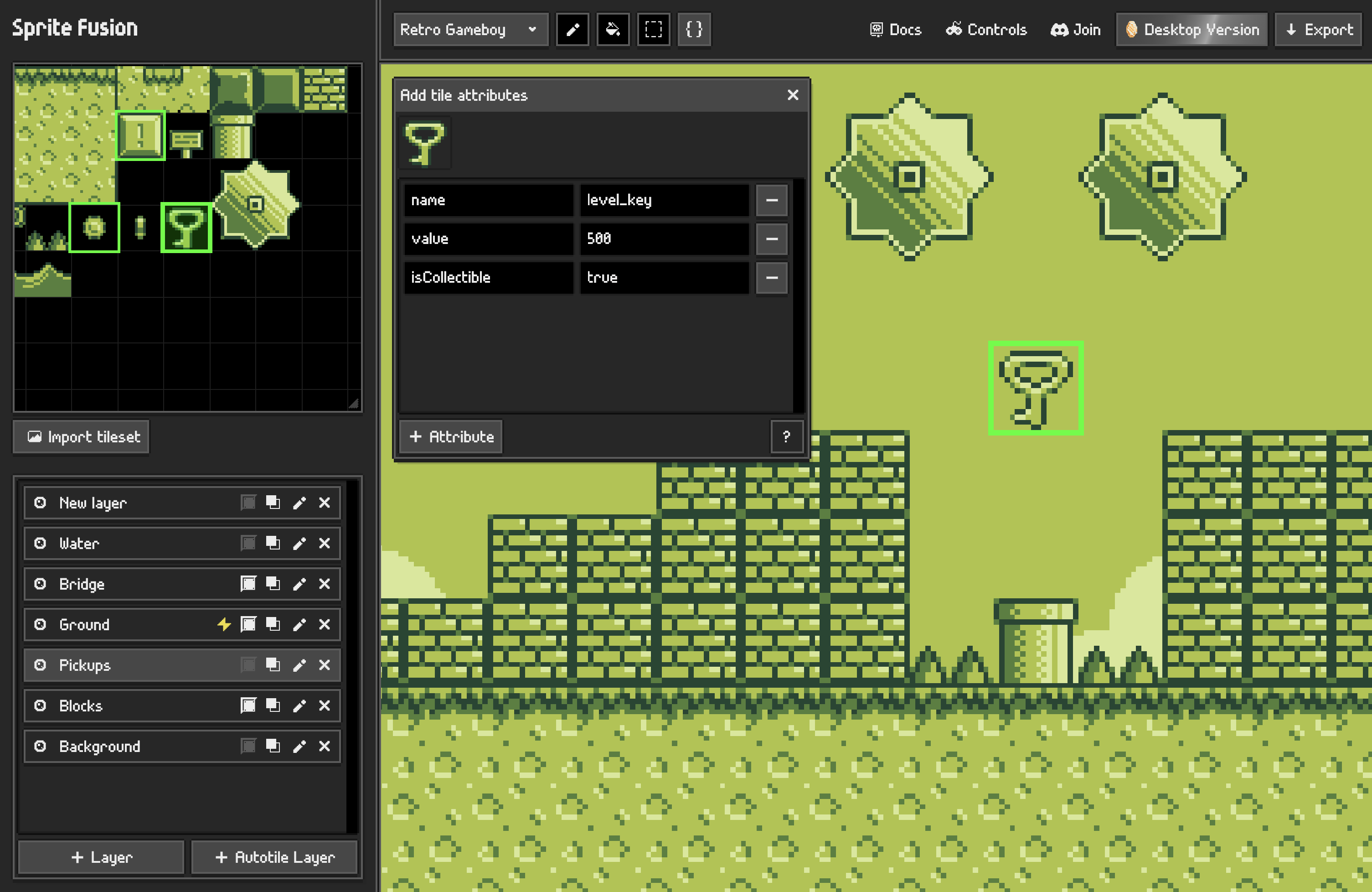
What Attributes Are
Attributes are custom data stored on tiles.
Use them for gameplay or runtime metadata:
health: 10isDangerous: truetype: "water"spawn: "enemy"
Supported value types:
| Type | Example |
|---|---|
| String | type: "lava" |
| Number | damage: 25 |
| Boolean | isSolid: false |
Attribute keys must be unique on the same tile.
When the Attributes tool is selected, tiles that already have attributes are outlined in green in both the tileset panel and the map editor.
Two Attribute Modes
Sprite Fusion has two attribute modes. You can switch mode in the project settings
| Mode | Where you edit | Behavior |
|---|---|---|
| Per-tile attributes | Tileset panel | Every placement of that tile shares the same attributes. |
| Per-tile instance attributes | Map editor | Each placed tile can have its own attributes. |
Per-tile Attributes
Per-tile attributes are the default mode.
You set the attributes on the tileset tile. Every time that tile is placed on the map, it carries those attributes.
Best for:
- Collision categories
- Terrain tags
- Hazard markers
- Spawn markers
- Engine exports
In this mode, changing the attributes of a tileset tile also updates matching placed tiles on the map.
Per-tile Instance Attributes
Per-tile instance attributes let different placements of the same tile hold different data.
Use this when the same tile graphic can mean different things depending on where it is placed.
Best for:
- Custom JSON pipelines
- Per-object values
- One-off markers
- Runtime data that only your game understands
This mode is more flexible, but most strict engine exports do not support it.
Export Behavior
Per-tile attributes are the safest option and per-tile instance attributes are only recommended for custom engine usage.
| Export | Attribute behavior |
|---|---|
| Unity | Per-tile attributes only. |
| Godot 4 | Per-tile attributes as TileSet custom data. |
| Godot 3 | Per-tile attributes through tile_data.json. |
| Defold | Per-tile attributes through tile_data.json. |
| TMX, Phaser, GDevelop, Cocos | Per-tile attributes as Tiled tile properties. |
| Love2D | Per-tile attributes through Tiled/Lua data. |
| UVTT | Per-tile attributes through tile_data.json. |
| Sprite Fusion JSON | Preserves native attribute data. |
| Bevy | Supports attributes through Sprite Fusion JSON and the Bevy plugin workflow. |
| PNG, GB Studio | Attributes are not exported. |
Best Practice
Use Per-tile attributes by default.
Only enable per-tile instance attributes when your export target can consume them, or when you are using Sprite Fusion JSON with your own engine.
Get the Desktop Version
- Works 100% offline
- Faster map exports
- One-time purchase
- Lifetime updates included

